How to use the advanced product filter
Advanced product filter
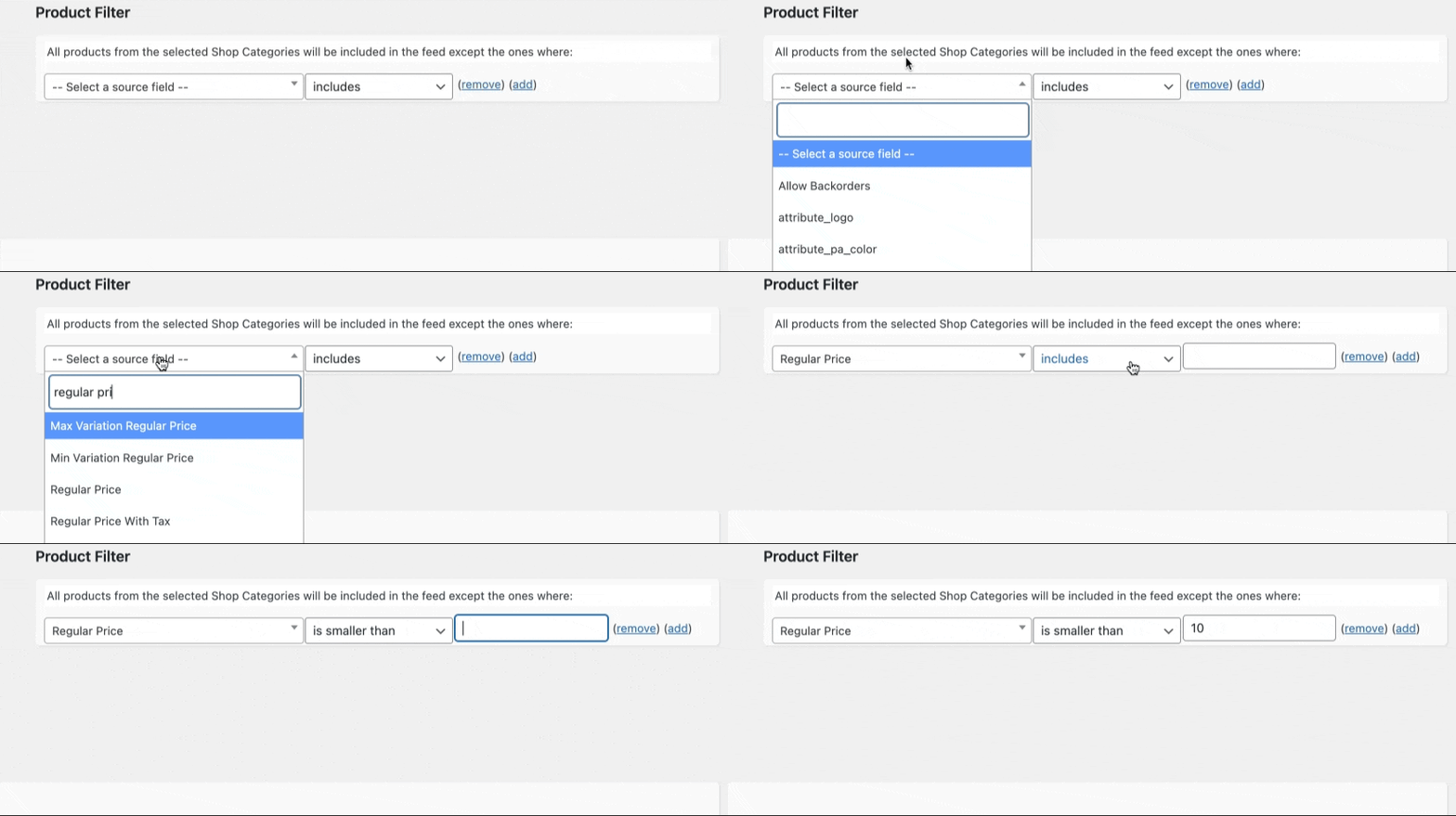
Advanced product filters in the WooCommerce Product Feed Manager provide a powerful way to refine your product feeds, ensuring only the most relevant products are advertised. Whether you’re looking to exclude low-margin items, or underperforming products, or simply want to tailor your feed more precisely, here’s how to leverage advanced filters effectively:
Reasons for Excluding Products:
- Profitability: Exclude products with low margins that aren’t cost-effective to advertise.
- Low-performing products: Remove products that haven’t performed well in marketing campaigns.
- Products that are out of stock: Filter out products that are out of stock or not currently available.
- Products you don’t want to sell for other reasons.
Setting Up Advanced Filters:
- Accessing Filters: Within your feed editor, locate the category mapping section. Here, you’ll find an ‘edit’ link indicating that all products from selected shop categories will be included in the feed. Click this link to access the filtering options.
- Configuring Filters: A condition editor will appear, allowing you to set conditions based on product source fields. This enables you to exclude products based on criteria such as Product ID, SKU, or regular price.
- For example, to exclude products priced below a certain threshold, select the ‘Regular price’ source field, choose ‘is smaller than’ from the condition dropdown, and enter your price limit.
Practical Use Case:
Imagine you want to exclude low-priced items from a specific category, such as Music, where the cost-per-acquisition (CPA) might exceed the gross margin for items under $10. Using the advanced filters, you can set a condition to exclude all products from the Music category priced below this threshold.

Implementing the Filter:
- After clicking the ‘edit’ link under the category mapping section, after the text “All products from the selected Shop Categories will be included in the feed except the ones where:”.
- Select ‘Regular price’ as your source field, then ‘is smaller than’ as the condition, and input ’10’ as the value.
- Upon saving, your feed will automatically exclude products from the Music category priced below $10.
How-To Video:
For a step-by-step visual guide on setting up and using advanced product filters, please refer to our instructional video. This resource will walk you through the process, ensuring you can effectively apply filters to your product feed.
By mastering the use of advanced product filters, you can significantly enhance the precision and effectiveness of your product feeds, aligning them more closely with your marketing objectives and inventory management strategies.